Quick Authorize - Adding Authorization to a Prescription
Quick Authorize is a Workbench Rx action that allows authorization to be added to pre-authorized and unauthorized prescriptions without opening the prescriptions in Rx Detail.
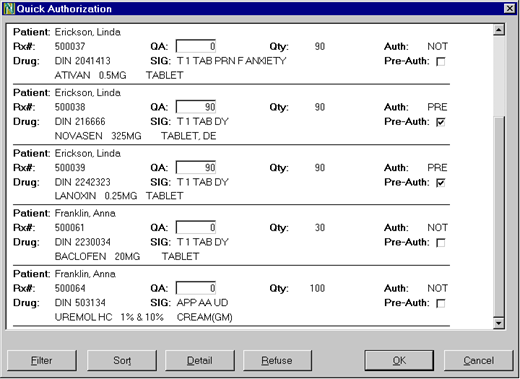
Selecting Quick Authorize opens the Quick Authorization window which displays a list of prescriptions that have an authorization status of PRE or NOT (the same prescriptions are stored in the Workbench Pending tab until they are authorized). These prescriptions can be authorized, refused, or opened in Rx Detail.
Note: Quick Authorize is not available in British Columbia.
Adding Authorization to Unauthorized Prescriptions
Unauthorized prescriptions have a 0 in the QA field and are identified by NOT in the Auth field.
To add authorization to unauthorized prescriptions in PharmaClik Rx:
- From the Workbench, select Rx > Quick Authorize. The Quick Authorization window opens.
- Select the prescription you want to authorize.
- In the QA field, specify the new authorization value.
- Repeat steps 2-3 for any other unauthorized prescriptions.
- Select OK.
Result: The authorization will be applied to the prescription. The prescription will be placed in the Queue and submitted for billing. Once the prescription is successfully adjudicated and removed from the Queue, it will have a status of Complete and will move to the Completed tab (in the Workbench). A new label set will print and the File Copy will indicate "Modified Authorization".
Note: A new label set will not print for Cash prescriptions.
Adding Authorization to Pre-Authorized Prescriptions
- From the Workbench, select Rx > Quick Authorize. The Quick Authorization window opens.
- Select the prescription you want to authorize.
- If the authorized amount is different from the value already in the QA field, specify the new authorization in the QA field.
- Deselect the Pre-Auth checkbox.
- Repeat steps 2-4 for any other pre-authorized prescriptions.
- Select OK.
Result: The authorization will be applied to the prescription. The prescription will have a status of Complete and will move to the Completed tab (in the Workbench). No label set will print.